Case Study
Designing a Reliable Three‑Sided Food Delivery Ecosystem
Role: Product Designer & Design Systems Contributor
Timeline: 16 weeks to v1 pilot
Team: PM, Engineers (Mobile), Engineers (Backend/Infra), Data Analyst, Merchant Ops
Customer app
Courier app
Restaurant platform
TL:DR - Why this work matters
Food delivery succeeds or fails on reliability. Customers want trustworthy ETAs and clear fees, couriers need safe, efficient routes and predictable earnings, and restaurants crave calmer operations. We designed a three‑sided system that unifies those needs into one dependable flow.Target outcomes (first 90 days post‑launch): Checkout conversion: +6 to +10 percentCourier pickup wait: −15 to −25 percentLate or missed orders: −15 to −20 percentSupport contacts per order: −25 to −40 percent

North Star: One truth, everywhere. The status of an order should be consistent across Customer, Courier, and Restaurant surfaces, with accurate ETAs and minimal idle time.
The Challenge
Local players proved the demand, but users were losing trust: hidden fees at checkout, unreliable ETAs, couriers waiting idly in kitchens, and restaurants overwhelmed by tablets and call‑backs. Our goal was to ship a cohesive v1 that felt calm for operators, safe for couriers, and confidence‑building for customers.
Who We Serve
Customers want fast discovery, price clarity, and accurate ETAs.Couriers (Drivers/Riders) want safe, efficient jobs with low pickup friction.Restaurant Operators want simple menus, controllable intake, and clean payouts.
Jobs to be Done• Customer: “Help me decide quickly and know when my food truly arrives.”• Courier: “Help me complete more safe deliveries per shift with less waiting.”• Restaurant: “Help me accept what I can produce, keep the line moving, and reconcile payouts without hassle.”
Architecture → UX: How the Loop Shapes the Interface
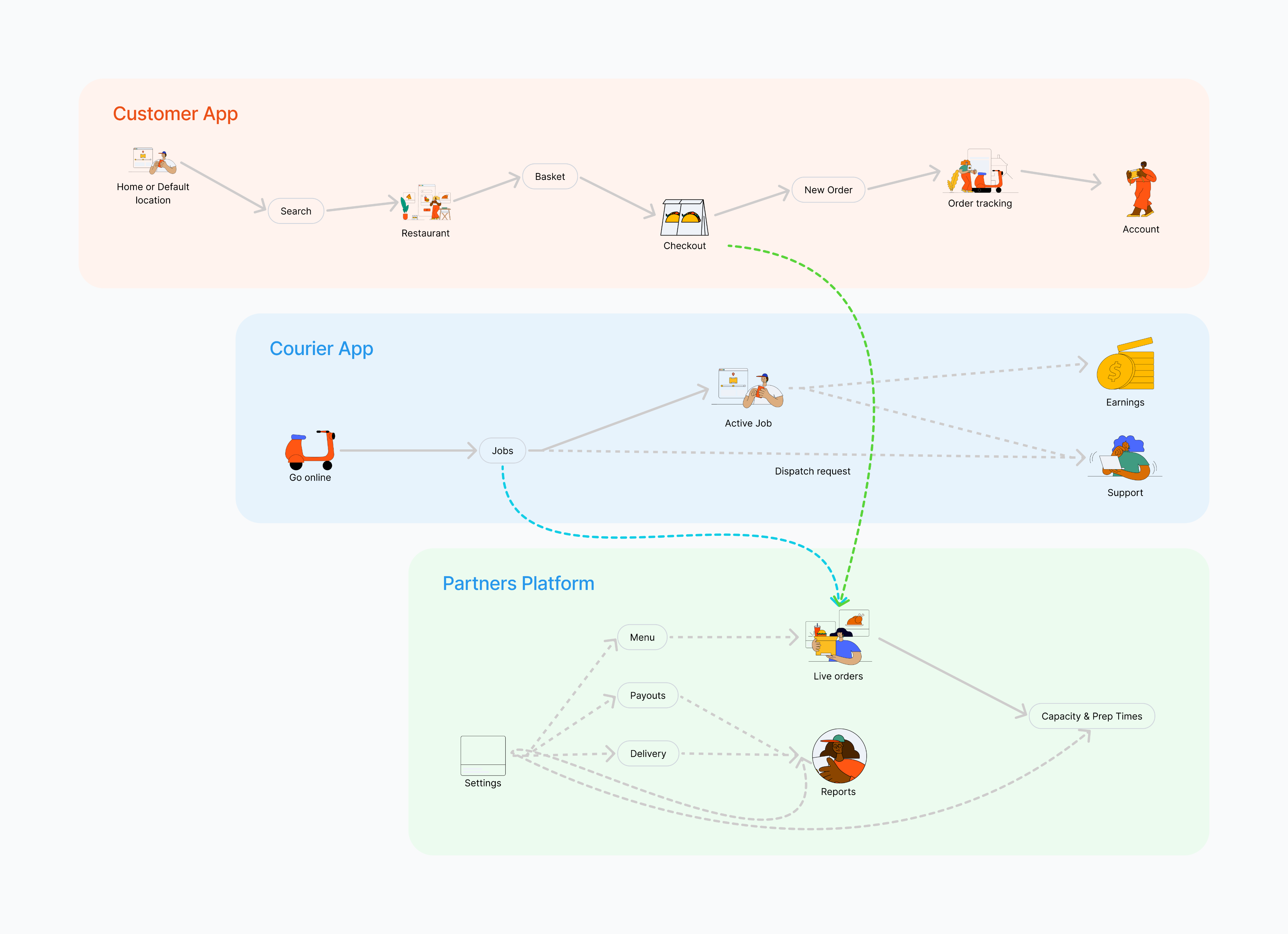
Information Architecture
Discovery and research
Methods Contextual inquiry in kitchens, ride-alongs with couriers, diary study with frequent orderers, competitor teardowns, and analytics review of funnel drop-offs.
Sampling highlights
- 12 restaurants across quick-service and casual dining
- 18 couriers using bikes and cars; peak and off-peak routes
- 20 customers split between “I know what I want” and “browse and discover”
Core User Flows - Why it matters to design
- Customer: Browse → Pay → Track
A fast, trustworthy way to discover nearby restaurants, see honest fees and ETAs, place orders in a few taps, and track delivery in real time.
- Onboarding & Auth Sequence
We optimise for speed without sacrificing trust. The splash and welcome screens immediately set two paths: Get started as a customer or Join as a courier, so people self-select early. Real-time validation catches errors inline (wrong email format, weak password, invalid phone), so users correct issues without losing momentum.
Once signed in, address capture uses autocomplete plus a map pin to avoid “near my gate” ambiguity common in last-mile delivery. To help couriers, we ask for building type (house, apartment, office, etc.). The final profile screen confirms personal details and address, then celebrates completion with a clear Go to App action.
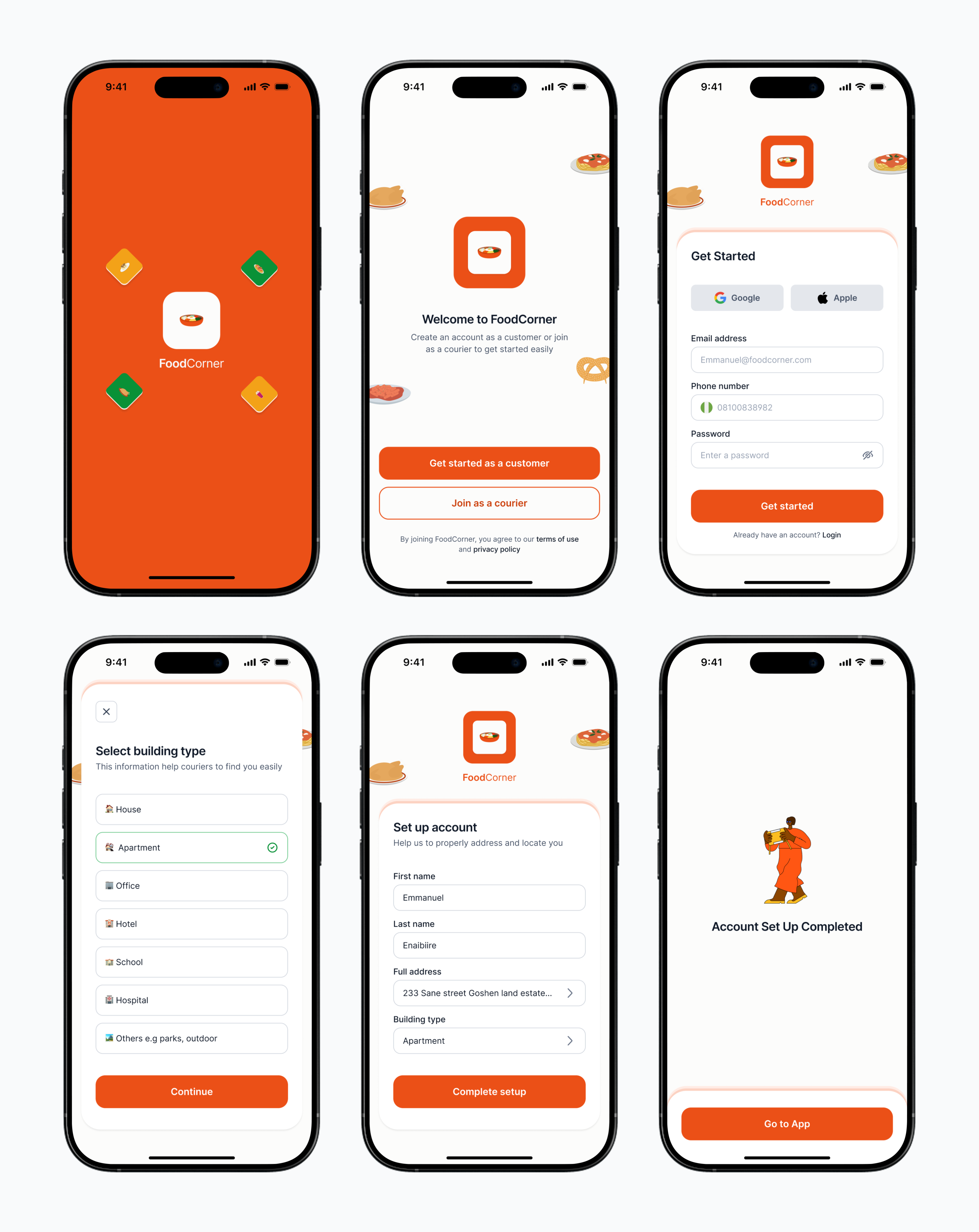
Get Started screens, Onboarding + Auth sequence
- App Exploration, Navigation & Filters
- Market gate: If a city isn’t live, users can still Explore App or sign up email to get notified when their city is live—no dead ends.
- Address control upfront: Top-bar location pill opens current location / saved / new. A map pin + landmark search confirms the exact spot before browsing.
- Intent-led home: Sections like What you might be craving, Exciting deals, and Stores near you surface realistic ETA bands and fees early to reduce surprises.
- Fast search & filters: Inline search plus a focused filter sheet for Sort, Rating, Delivery fee, Delivery time, Discounts. Applied filters appear
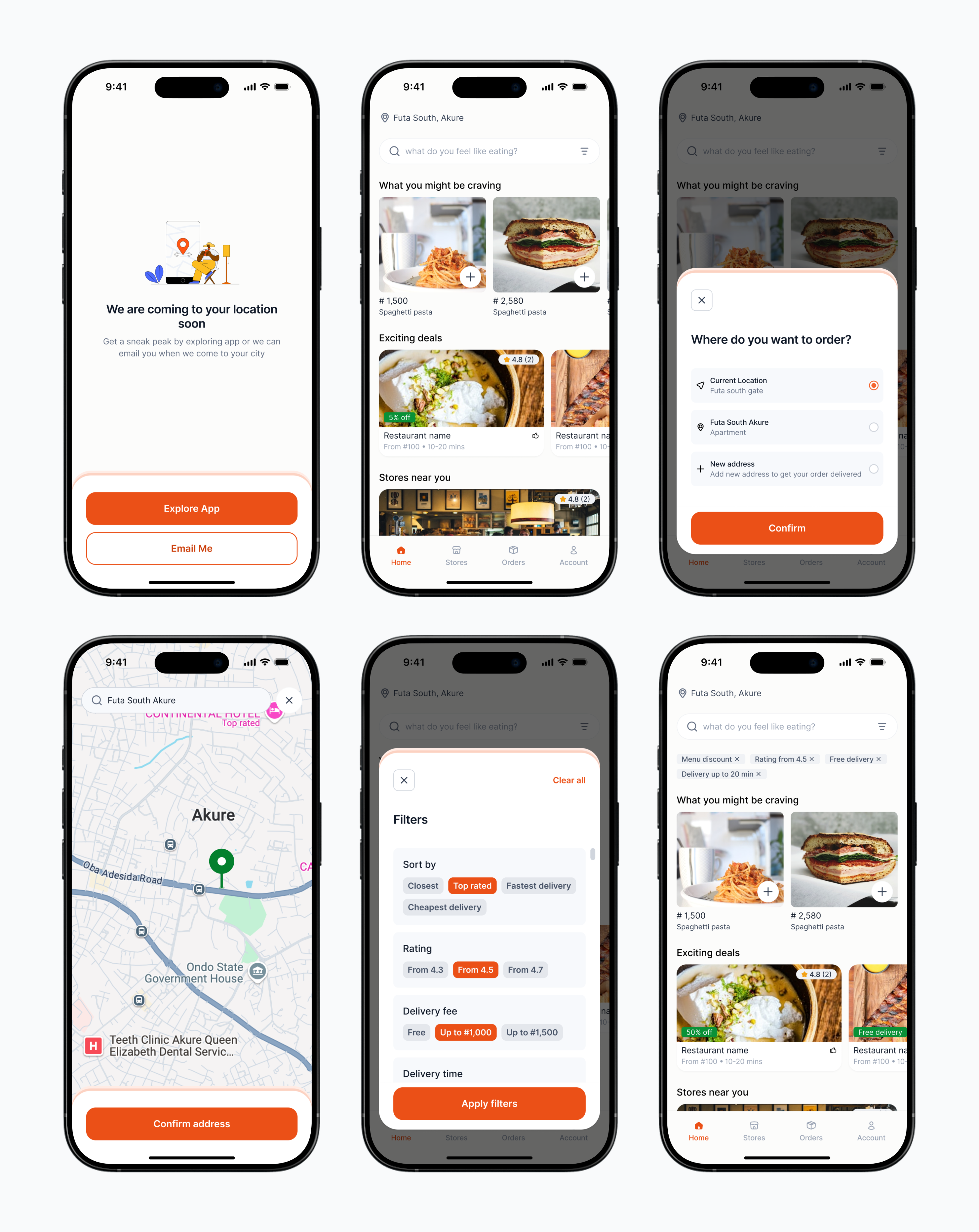
Home and browsing flow, filter sheet and results with active filter chips
- Store/Restaurant Search & Exploration
From Stores in the bottom nav, users see a location-aware list of nearby restaurants with rating, price cues, and honest time bands (e.g., “10–20 mins”). Tapping a card opens the restaurant with a sticky header (name, open/closed state, hours link) and category chips (All, Snacks, Drinks, etc.) for rapid scanning. Items are displayed in a clean grid with consistent photos and a quick-add “+” for default items.
Selecting an item opens a lightweight sheet: price, short description, and extras/modifiers.
Walkthrough of exploring a restaurant page
- Placing Order & Tracking
- Transparent checkout with editable items, delivery details, notes, and clear fee breakdown; pay by card or bank transfer.
- Post-payment, users land on Order details with a consistent timeline (Placed → Accepted → Picked up → On the way → Delivered).
- Live map shows courier route and ETA range; updates explain changes.
- Orders tab lists ongoing and past orders for quick re-open and re-order.
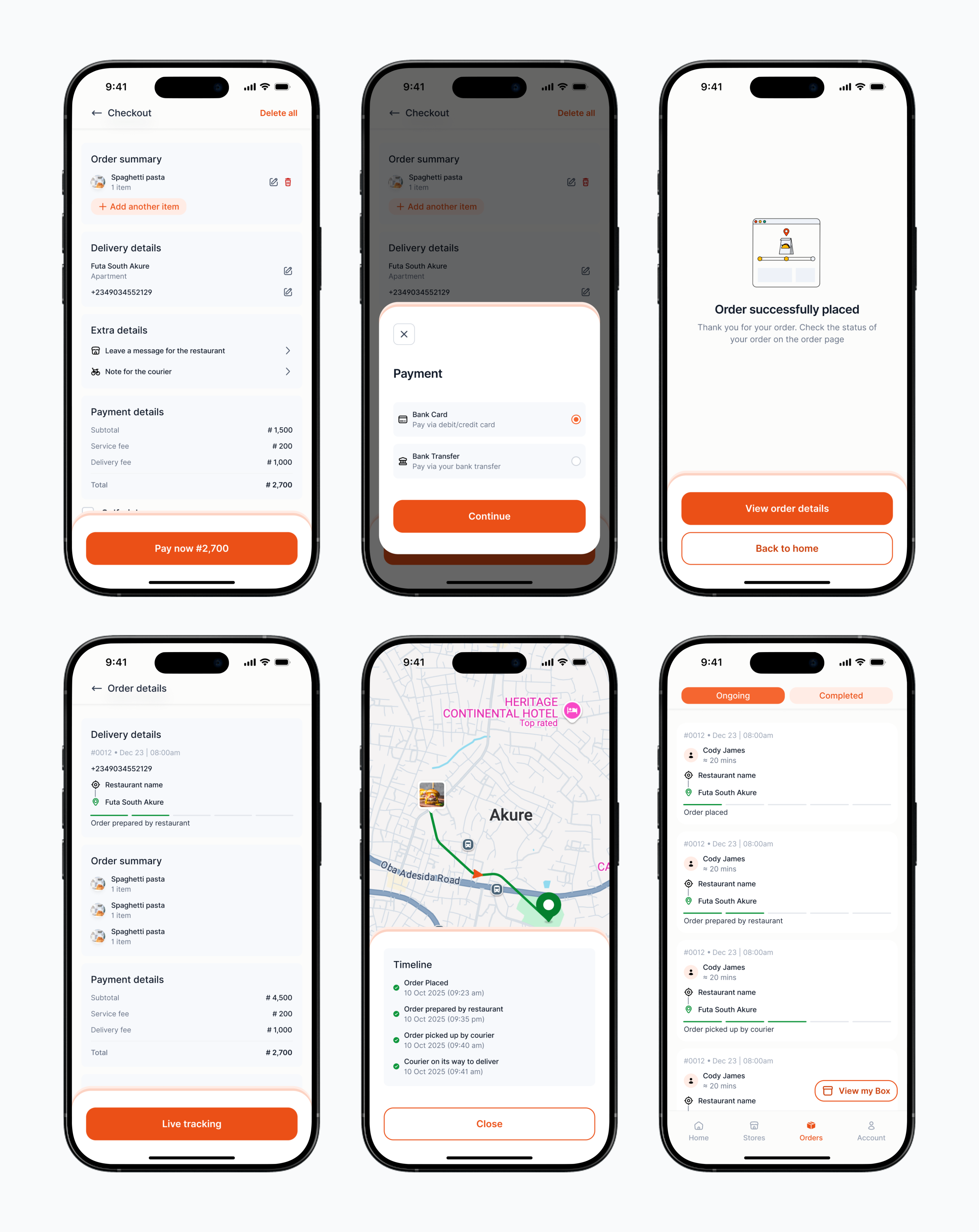
Checkout to live tracking: clear fees, payment, timeline, map with ETA, and orders list
- Rate the Order
After delivery, the Order details screen prompts a lightweight rating: an emoji scale for food quality and a 1–5 star rating for the courier, each with optional comments. Submitting instantly thanks the user and closes the loop, feeding insights to restaurant operations and courier coaching while keeping friction minimal.
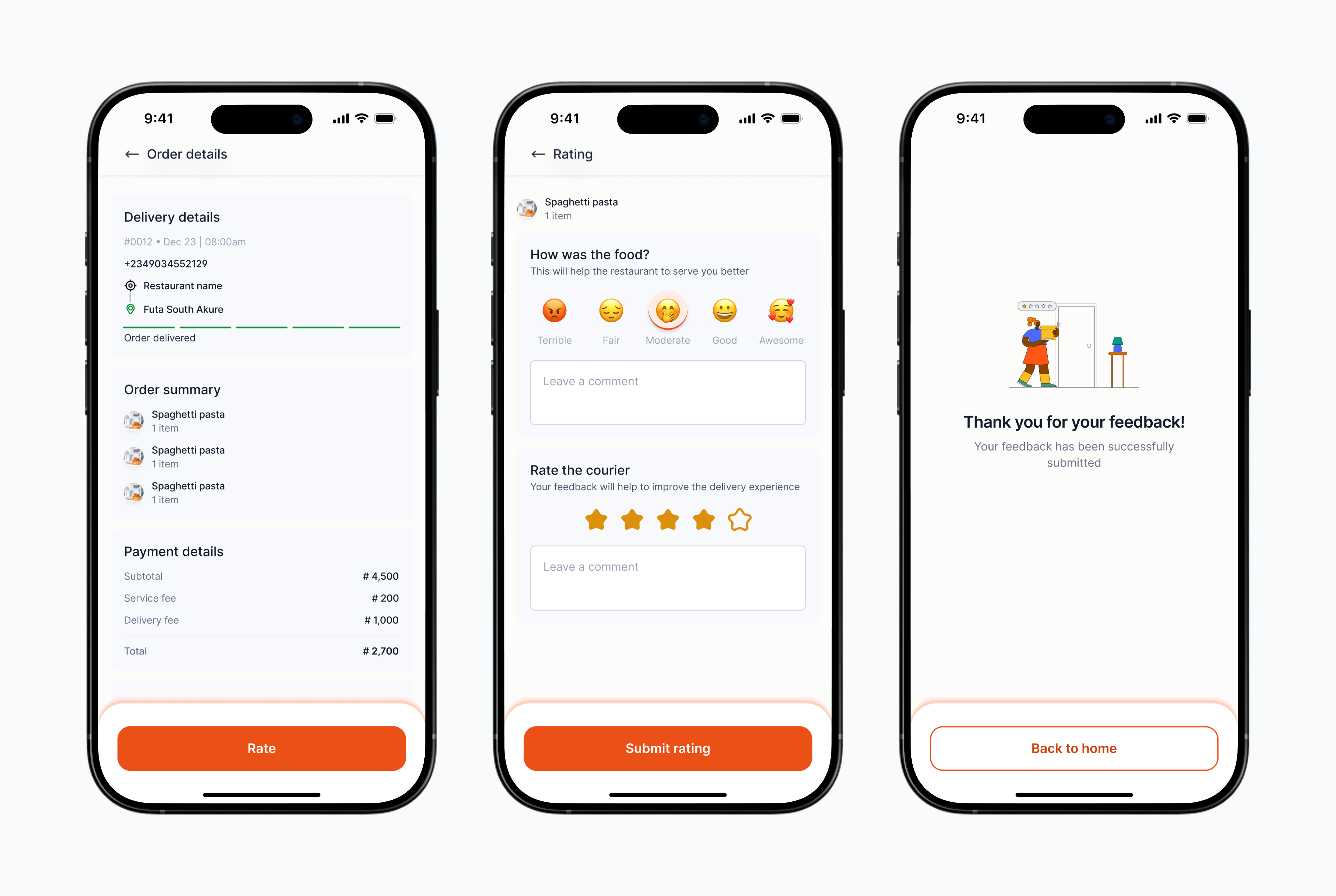
Post-delivery rating: food emoji scale, courier star rating with comments
- Courier App (Driver/Rider)
Go online, accept the right jobs, navigate safely, and complete proof-of-delivery with clear earnings, live support, and on-shift privacy.
- Availability, Accepting Jobs & Completing Delivery
Riders toggle Go online to enter the dispatch pool. New offers appear in Pending with pickup distance, items, and drop-off info; one tap Accept moves a job to Ongoing. The job detail shows route, ETA, and contact options. At drop-off, the rider completes proof of delivery with a secure secret code (with “Didn’t get code?” fallback) and marks the job Completed. Status updates are reflected instantly across Customer and Restaurant surfaces.
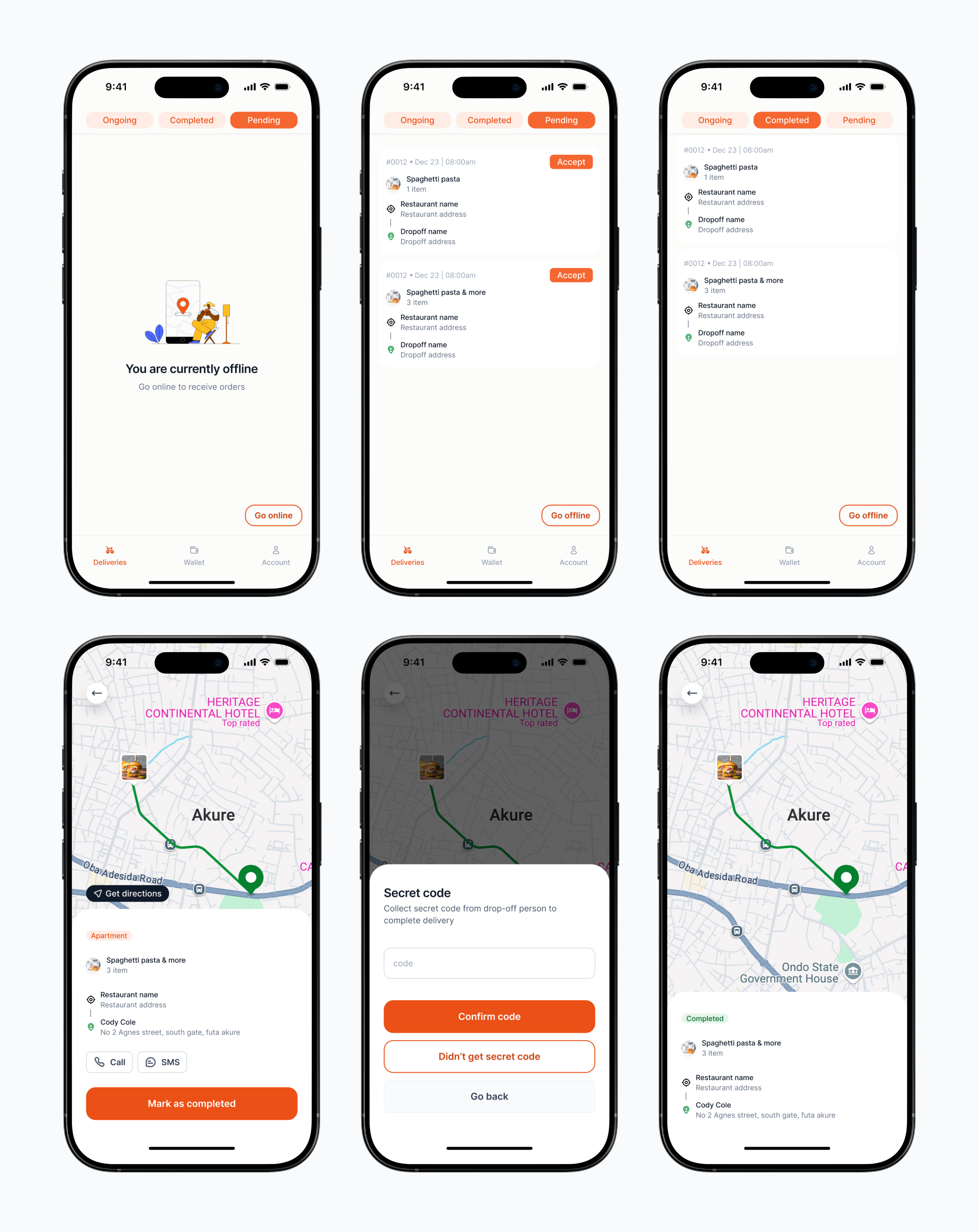
Courier goes online, accepts a job, enters secret code for proof of delivery, and marks order as completed
- Wallet & Payouts
Couriers see a clear Wallet balance with a chronological Transactions list (deposits from completed jobs and past withdrawals). Tapping Withdraw opens a simple form: enter amount, review the bank transfer destination, and confirm. If no payout account is set, a friendly prompt asks them to Add account first; switching accounts is one tap.
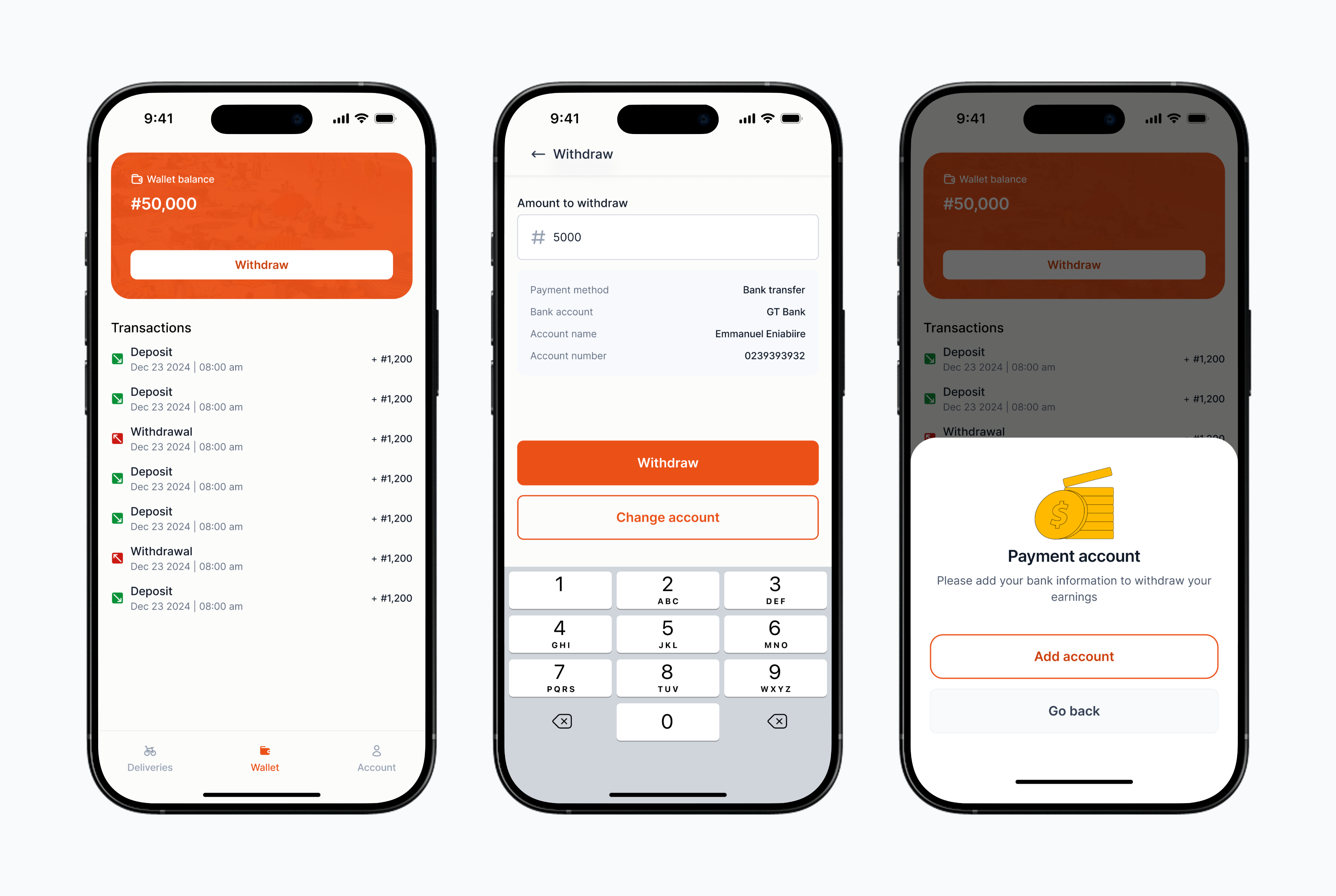
Courier wallet showing balance and transactions
- Partners Platform (for restaurants and delivery ops)
- Orders hub: One searchable, filterable table with clear status chips, explicit Assign actions, and “Assigned to” visibility; supports bulk actions and pagination.
- Products: Manage categories, items, modifiers, photos, allergen flags; instant availability toggles and safe-drafted promos/price changes.
- Customers: Lightweight CRM with recency, frequency, value, and issue tags.
- Delivery: Trips list with milestones, Couriers roster with online/offline and documents, Tracking map with live routes and reassign.
- Settings & Finance: Hours, areas, roles; payouts, statements, disputes.
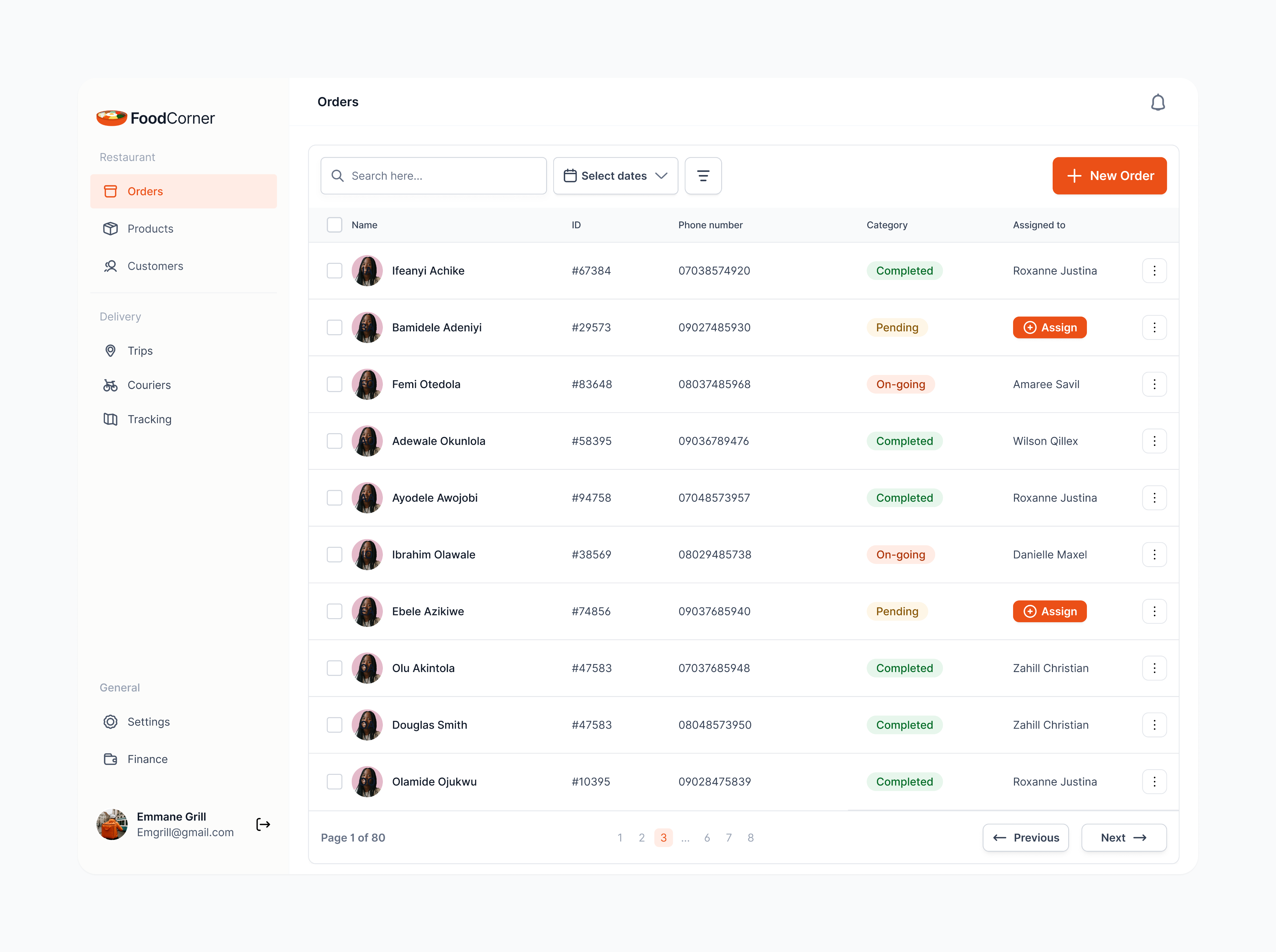
Orders table with search, date filter, status chips and Assign actions
Edge Cases Designed For
- Payment retry when network blips
- Courier reassignment after restaurant cancels
- Address ambiguity handled with landmark prompts
- Inclement weather surge explained proactively
- Photo‑only proof fallback when customer cannot share PIN

Connect with me to explore your project's potential.


CONTACT
+234 903 455 2129
emmanueleniabiire@gmail.com
SOCIAL
HemmaH_OS


Case Study
Designing a Reliable Three‑Sided Food Delivery Ecosystem
Role: Product Designer (end‑to‑end UX, design system, research, IA, prototyping)
Timeline: 16 weeks to v1 pilot
Team: PM, Engineers (Mobile), Engineers (Backend/Infra), Data Analyst, Merchant Ops
Customer app
Courier app
Restaurant platform
TL:DR - Why this work matters
Food delivery succeeds or fails on reliability. Customers want trustworthy ETAs and clear fees, couriers need safe, efficient routes and predictable earnings, and restaurants crave calmer operations. We designed a three‑sided system that unifies those needs into one dependable flow.Target outcomes (first 90 days post‑launch): Checkout conversion: +6 to +10 percentCourier pickup wait: −15 to −25 percentLate or missed orders: −15 to −20 percentSupport contacts per order: −25 to −40 percent

North Star: One truth, everywhere. The status of an order should be consistent across Customer, Courier, and Restaurant surfaces, with accurate ETAs and minimal idle time.
The Challenge
Local players proved the demand, but users were losing trust: hidden fees at checkout, unreliable ETAs, couriers waiting idly in kitchens, and restaurants overwhelmed by tablets and call‑backs. Our goal was to ship a cohesive v1 that felt calm for operators, safe for couriers, and confidence‑building for customers.
Who We Serve
Customers want fast discovery, price clarity, and accurate ETAs.Couriers (Drivers/Riders) want safe, efficient jobs with low pickup friction.Restaurant Operators want simple menus, controllable intake, and clean payouts.
Jobs to be Done• Customer: “Help me decide quickly and know when my food truly arrives.”• Courier: “Help me complete more safe deliveries per shift with less waiting.”• Restaurant: “Help me accept what I can produce, keep the line moving, and reconcile payouts without hassle.”
Architecture → UX: How the Loop Shapes the Interface
Information Architecture
Discovery and research
Methods Contextual inquiry in kitchens, ride-alongs with couriers, diary study with frequent orderers, competitor teardowns, and analytics review of funnel drop-offs.
Sampling highlights
- 12 restaurants across quick-service and casual dining
- 18 couriers using bikes and cars; peak and off-peak routes
- 20 customers split between “I know what I want” and “browse and discover”
Core User Flows - Why it matters to design
- Customer: Browse → Pay → Track
A fast, trustworthy way to discover nearby restaurants, see honest fees and ETAs, place orders in a few taps, and track delivery in real time.
- Onboarding & Auth Sequence
We optimise for speed without sacrificing trust. The splash and welcome screens immediately set two paths: Get started as a customer or Join as a courier, so people self-select early. Real-time validation catches errors inline (wrong email format, weak password, invalid phone), so users correct issues without losing momentum.
Once signed in, address capture uses autocomplete plus a map pin to avoid “near my gate” ambiguity common in last-mile delivery. To help couriers, we ask for building type (house, apartment, office, etc.). The final profile screen confirms personal details and address, then celebrates completion with a clear Go to App action.
Get Started screens, Onboarding + Auth sequence
- App Exploration, Navigation & Filters
- Market gate: If a city isn’t live, users can still Explore App or sign up email to get notified when their city is live—no dead ends.
- Address control upfront: Top-bar location pill opens current location / saved / new. A map pin + landmark search confirms the exact spot before browsing.
- Intent-led home: Sections like What you might be craving, Exciting deals, and Stores near you surface realistic ETA bands and fees early to reduce surprises.
- Fast search & filters: Inline search plus a focused filter sheet for Sort, Rating, Delivery fee, Delivery time, Discounts. Applied filters appear
Home and browsing flow, filter sheet and results with active filter chips
- Store/Restaurant Search & Exploration
From Stores in the bottom nav, users see a location-aware list of nearby restaurants with rating, price cues, and honest time bands (e.g., “10–20 mins”). Tapping a card opens the restaurant with a sticky header (name, open/closed state, hours link) and category chips (All, Snacks, Drinks, etc.) for rapid scanning. Items are displayed in a clean grid with consistent photos and a quick-add “+” for default items.
Selecting an item opens a lightweight sheet: price, short description, and extras/modifiers.
Walkthrough of exploring a restaurant page
- Placing Order & Tracking
- Transparent checkout with editable items, delivery details, notes, and clear fee breakdown; pay by card or bank transfer.
- Post-payment, users land on Order details with a consistent timeline (Placed → Accepted → Picked up → On the way → Delivered).
- Live map shows courier route and ETA range; updates explain changes.
- Orders tab lists ongoing and past orders for quick re-open and re-order.
Checkout to live tracking: clear fees, payment, timeline, map with ETA, and orders list
- Rate the Order
After delivery, the Order details screen prompts a lightweight rating: an emoji scale for food quality and a 1–5 star rating for the courier, each with optional comments. Submitting instantly thanks the user and closes the loop, feeding insights to restaurant operations and courier coaching while keeping friction minimal.
Post-delivery rating: food emoji scale, courier star rating with comments
- Courier App (Driver/Rider)
Go online, accept the right jobs, navigate safely, and complete proof-of-delivery with clear earnings, live support, and on-shift privacy.
- Availability, Accepting Jobs & Completing Delivery
Riders toggle Go online to enter the dispatch pool. New offers appear in Pending with pickup distance, items, and drop-off info; one tap Accept moves a job to Ongoing. The job detail shows route, ETA, and contact options. At drop-off, the rider completes proof of delivery with a secure secret code (with “Didn’t get code?” fallback) and marks the job Completed. Status updates are reflected instantly across Customer and Restaurant surfaces.
Courier goes online, accepts a job, enters secret code for proof of delivery, and marks order as completed
- Wallet & Payouts
Couriers see a clear Wallet balance with a chronological Transactions list (deposits from completed jobs and past withdrawals). Tapping Withdraw opens a simple form: enter amount, review the bank transfer destination, and confirm. If no payout account is set, a friendly prompt asks them to Add account first; switching accounts is one tap.
Courier wallet showing balance and transactions
- Partners Platform (for restaurants and delivery ops)
- Orders hub: One searchable, filterable table with clear status chips, explicit Assign actions, and “Assigned to” visibility; supports bulk actions and pagination.
- Products: Manage categories, items, modifiers, photos, allergen flags; instant availability toggles and safe-drafted promos/price changes.
- Customers: Lightweight CRM with recency, frequency, value, and issue tags.
- Delivery: Trips list with milestones, Couriers roster with online/offline and documents, Tracking map with live routes and reassign.
- Settings & Finance: Hours, areas, roles; payouts, statements, disputes.
Orders table with search, date filter, status chips and Assign actions
Edge Cases Designed For
- Payment retry when network blips
- Courier reassignment after restaurant cancels
- Address ambiguity handled with landmark prompts
- Inclement weather surge explained proactively
- Photo‑only proof fallback when customer cannot share PIN

Connect with me to explore your project's potential.

CONTACT
+234 903 455 2129
emmanueleniabiire@gmail.com
SOCIAL
HemmaH_OS
Case Study
Designing a Reliable Three‑Sided Food Delivery Ecosystem
Role: Product Designer (end‑to‑end UX, design system, research, IA, prototyping)
Timeline: 16 weeks to v1 pilot
Team: PM, Engineers (Mobile), Engineers (Backend/Infra), Data Analyst, Merchant Ops
Customer app
Courier app
Restaurant platform
TL:DR - Why this work matters
Food delivery succeeds or fails on reliability. Customers want trustworthy ETAs and clear fees, couriers need safe, efficient routes and predictable earnings, and restaurants crave calmer operations. We designed a three‑sided system that unifies those needs into one dependable flow.Target outcomes (first 90 days post‑launch): Checkout conversion: +6 to +10 percentCourier pickup wait: −15 to −25 percentLate or missed orders: −15 to −20 percentSupport contacts per order: −25 to −40 percent

North Star: One truth, everywhere. The status of an order should be consistent across Customer, Courier, and Restaurant surfaces, with accurate ETAs and minimal idle time.
The Challenge
Local players proved the demand, but users were losing trust: hidden fees at checkout, unreliable ETAs, couriers waiting idly in kitchens, and restaurants overwhelmed by tablets and call‑backs. Our goal was to ship a cohesive v1 that felt calm for operators, safe for couriers, and confidence‑building for customers.
Who We Serve
Customers want fast discovery, price clarity, and accurate ETAs.Couriers (Drivers/Riders) want safe, efficient jobs with low pickup friction.Restaurant Operators want simple menus, controllable intake, and clean payouts.
Jobs to be Done• Customer: “Help me decide quickly and know when my food truly arrives.”• Courier: “Help me complete more safe deliveries per shift with less waiting.”• Restaurant: “Help me accept what I can produce, keep the line moving, and reconcile payouts without hassle.”
Architecture → UX: How the Loop Shapes the Interface
Information Architecture
Discovery and research
Methods Contextual inquiry in kitchens, ride-alongs with couriers, diary study with frequent orderers, competitor teardowns, and analytics review of funnel drop-offs.
Sampling highlights
- 12 restaurants across quick-service and casual dining
- 18 couriers using bikes and cars; peak and off-peak routes
- 20 customers split between “I know what I want” and “browse and discover”
Core User Flows - Why it matters to design
- Customer: Browse → Pay → Track
A fast, trustworthy way to discover nearby restaurants, see honest fees and ETAs, place orders in a few taps, and track delivery in real time.
- Onboarding & Auth Sequence
We optimise for speed without sacrificing trust. The splash and welcome screens immediately set two paths: Get started as a customer or Join as a courier, so people self-select early. Real-time validation catches errors inline (wrong email format, weak password, invalid phone), so users correct issues without losing momentum.
Once signed in, address capture uses autocomplete plus a map pin to avoid “near my gate” ambiguity common in last-mile delivery. To help couriers, we ask for building type (house, apartment, office, etc.). The final profile screen confirms personal details and address, then celebrates completion with a clear Go to App action.
Get Started screens, Onboarding + Auth sequence
- App Exploration, Navigation & Filters
- Market gate: If a city isn’t live, users can still Explore App or sign up email to get notified when their city is live—no dead ends.
- Address control upfront: Top-bar location pill opens current location / saved / new. A map pin + landmark search confirms the exact spot before browsing.
- Intent-led home: Sections like What you might be craving, Exciting deals, and Stores near you surface realistic ETA bands and fees early to reduce surprises.
- Fast search & filters: Inline search plus a focused filter sheet for Sort, Rating, Delivery fee, Delivery time, Discounts. Applied filters appear
Home and browsing flow, filter sheet and results with active filter chips
- Store/Restaurant Search & Exploration
From Stores in the bottom nav, users see a location-aware list of nearby restaurants with rating, price cues, and honest time bands (e.g., “10–20 mins”). Tapping a card opens the restaurant with a sticky header (name, open/closed state, hours link) and category chips (All, Snacks, Drinks, etc.) for rapid scanning. Items are displayed in a clean grid with consistent photos and a quick-add “+” for default items.
Selecting an item opens a lightweight sheet: price, short description, and extras/modifiers.
Walkthrough of exploring a restaurant page
- Placing Order & Tracking
- Transparent checkout with editable items, delivery details, notes, and clear fee breakdown; pay by card or bank transfer.
- Post-payment, users land on Order details with a consistent timeline (Placed → Accepted → Picked up → On the way → Delivered).
- Live map shows courier route and ETA range; updates explain changes.
- Orders tab lists ongoing and past orders for quick re-open and re-order.
Checkout to live tracking: clear fees, payment, timeline, map with ETA, and orders list
- Rate the Order
After delivery, the Order details screen prompts a lightweight rating: an emoji scale for food quality and a 1–5 star rating for the courier, each with optional comments. Submitting instantly thanks the user and closes the loop, feeding insights to restaurant operations and courier coaching while keeping friction minimal.
Post-delivery rating: food emoji scale, courier star rating with comments
- Courier App (Driver/Rider)
Go online, accept the right jobs, navigate safely, and complete proof-of-delivery with clear earnings, live support, and on-shift privacy.
- Availability, Accepting Jobs & Completing Delivery
Riders toggle Go online to enter the dispatch pool. New offers appear in Pending with pickup distance, items, and drop-off info; one tap Accept moves a job to Ongoing. The job detail shows route, ETA, and contact options. At drop-off, the rider completes proof of delivery with a secure secret code (with “Didn’t get code?” fallback) and marks the job Completed. Status updates are reflected instantly across Customer and Restaurant surfaces.
Courier goes online, accepts a job, enters secret code for proof of delivery, and marks order as completed
- Wallet & Payouts
Couriers see a clear Wallet balance with a chronological Transactions list (deposits from completed jobs and past withdrawals). Tapping Withdraw opens a simple form: enter amount, review the bank transfer destination, and confirm. If no payout account is set, a friendly prompt asks them to Add account first; switching accounts is one tap.
Courier wallet showing balance and transactions
- Partners Platform (for restaurants and delivery ops)
- Orders hub: One searchable, filterable table with clear status chips, explicit Assign actions, and “Assigned to” visibility; supports bulk actions and pagination.
- Products: Manage categories, items, modifiers, photos, allergen flags; instant availability toggles and safe-drafted promos/price changes.
- Customers: Lightweight CRM with recency, frequency, value, and issue tags.
- Delivery: Trips list with milestones, Couriers roster with online/offline and documents, Tracking map with live routes and reassign.
- Settings & Finance: Hours, areas, roles; payouts, statements, disputes.
Orders table with search, date filter, status chips and Assign actions
Edge Cases Designed For
- Payment retry when network blips
- Courier reassignment after restaurant cancels
- Address ambiguity handled with landmark prompts
- Inclement weather surge explained proactively
- Photo‑only proof fallback when customer cannot share PIN

Connect with me to explore your project's potential.


CONTACT
+234 903 455 2129
emmanueleniabiire@gmail.com
SOCIAL
HemmaH_OS